The "Context Collapse" Trap: How I Reclaimed 18 Hours a Week by Firing My Standalone AI Tabs in 2026

Table of Contents
- The April 2026 Disaster: How 5 Premium AI Subscriptions Ruined My Workflow
- The "Context Collapse" Phenomenon (And Why Prompt Engineering is Dead)
- The 2026 Showdown: ChatGPT vs Gemini (챗GPT 제미나이 비교)
- The Game Changer: Simultaneous Prompting (챗GPT 클로드 동시 사용)
- Why You Need an AI Integration Platform (AI 통합 플랫폼)
- The Financial Reality Check (AI 구독료 절약)
- My 2026 Tech Stack for Creators (크리에이터 AI 추천)
- Discussion & FAQ
The April 2026 Disaster: How 5 Premium AI Subscriptions Ruined My Workflow
Let me tell you about a catastrophic mistake I made in early April 2026. I was gearing up to launch a massive 4-part video series on technical SEO. Like any self-respecting tech creator, I thought throwing premium subscriptions at the problem would guarantee success.
I had my browser looking like a command center: ChatGPT Plus in tab one for ideation, Claude Pro in tab two for scriptwriting, Gemini Advanced in tab three for real-time data pulling, and Midjourney on Discord for thumbnails. I was paying roughly $80 a month, convinced I was a "power user."
I wasn't a power user. I was a glorified data entry clerk.
By day three, my workflow had devolved into a chaotic copy-paste nightmare. I'd ask Gemini to pull the latest May 2026 search algorithm updates. Then, I'd paste that into ChatGPT to outline the video. Then, I'd paste that outline into Claude to write the script. But Claude didn't have the original context of my brand voice that ChatGPT had learned over months. The script sounded like a corporate HR training manual.
I spent 14 hours just re-prompting, re-explaining my brand guidelines, and fixing formatting errors between tabs. I ended up scrapping the entire project and starting over from scratch.
The "Context Collapse" Phenomenon (And Why Prompt Engineering is Dead)
I'm going to say something controversial: In 2026, "prompt engineering" as we knew it in 2023 is dead. The real bottleneck for creators today isn't knowing the magic words to talk to an AI; it's Context Orchestration.
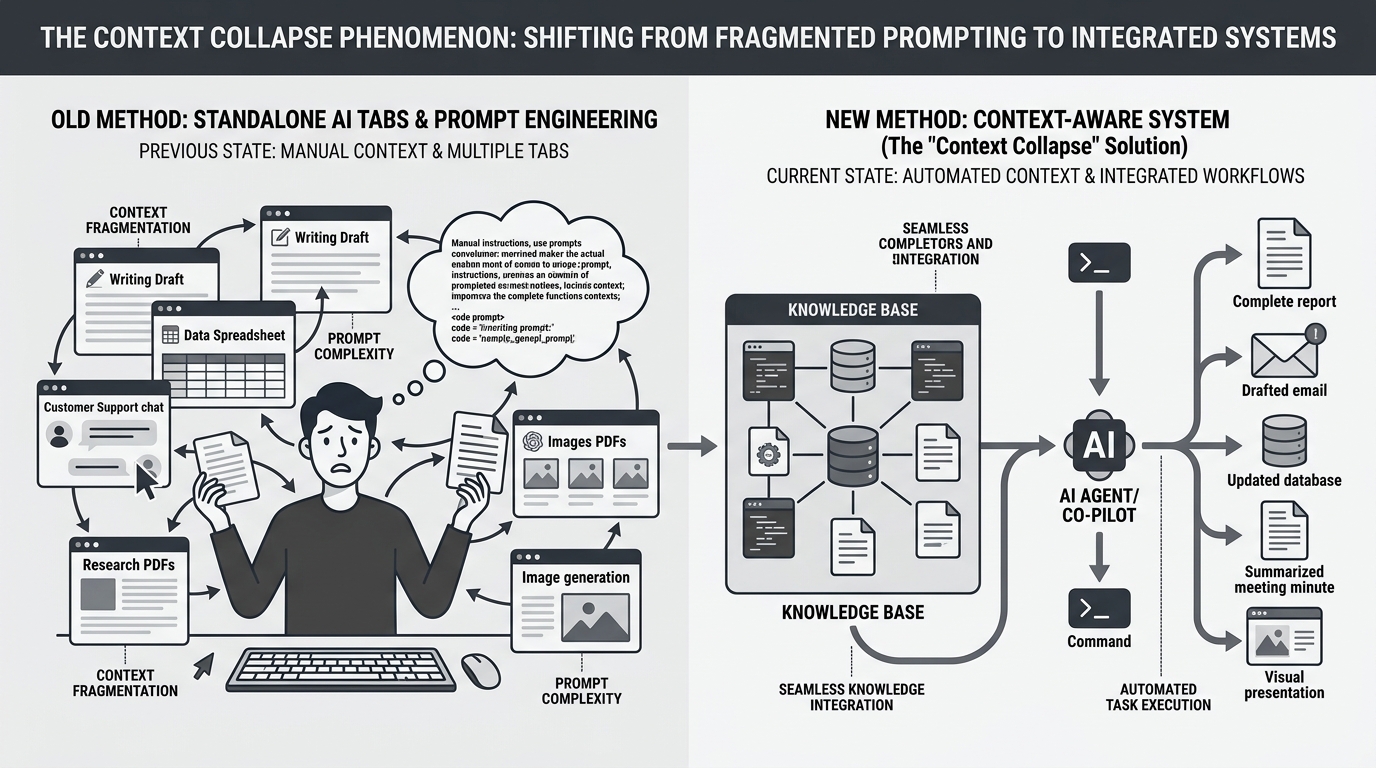
When you use standalone web interfaces, you are severely limiting your creative output. You are forcing yourself to act as the "bridge" between incredibly smart systems that, frankly, should just be talking to each other. If you are manually carrying data from one AI to another in 2026, you are wasting your most valuable asset: your time.
The 2026 Showdown: ChatGPT vs Gemini (챗GPT 제미나이 비교)
To understand why a unified approach is necessary, you have to look at the current state of the models. Last Tuesday, I ran a strict benchmarking test to evaluate where my time was actually going. I needed to do a deep-dive comparison—a proper 챗GPT 제미나이 비교 (ChatGPT vs Gemini comparison)—for a client's market research report.
Here is the raw, unfiltered data from my May 2026 test:
| Task / Capability (May 2026) | ChatGPT (GPT-4o) | Gemini (1.5 Pro Advanced) | My Verdict for Creators |
|---|---|---|---|
| Real-Time Web Research | Clunky. Often hallucinates links or relies on outdated cached data. | Lightning fast. Accurately pulled a Google Scholar paper published 3 hours prior. | Gemini wins for raw data gathering. |
| Creative Structuring | Excellent at creating logical, engaging narrative arcs. | Tends to be overly academic and dry. Misses emotional beats. | ChatGPT wins for outlining. |
| Nuance & Tone Adherence | Good, but occasionally slips into "AI-speak" (e.g., "In conclusion..."). | Struggles to hold a specific persona for more than 1,000 words. | Neither. (This is where Claude comes in). |
The takeaway? No single model is the "best." If you rely solely on ChatGPT, your data might be stale. If you rely solely on Gemini, your writing will lack soul. You need them all.
The Game Changer: Simultaneous Prompting (챗GPT 클로드 동시 사용)
This brings me to the breakthrough that completely changed my business in May 2026. I stopped using standalone tabs and moved to a unified interface that allows for simultaneous prompting.
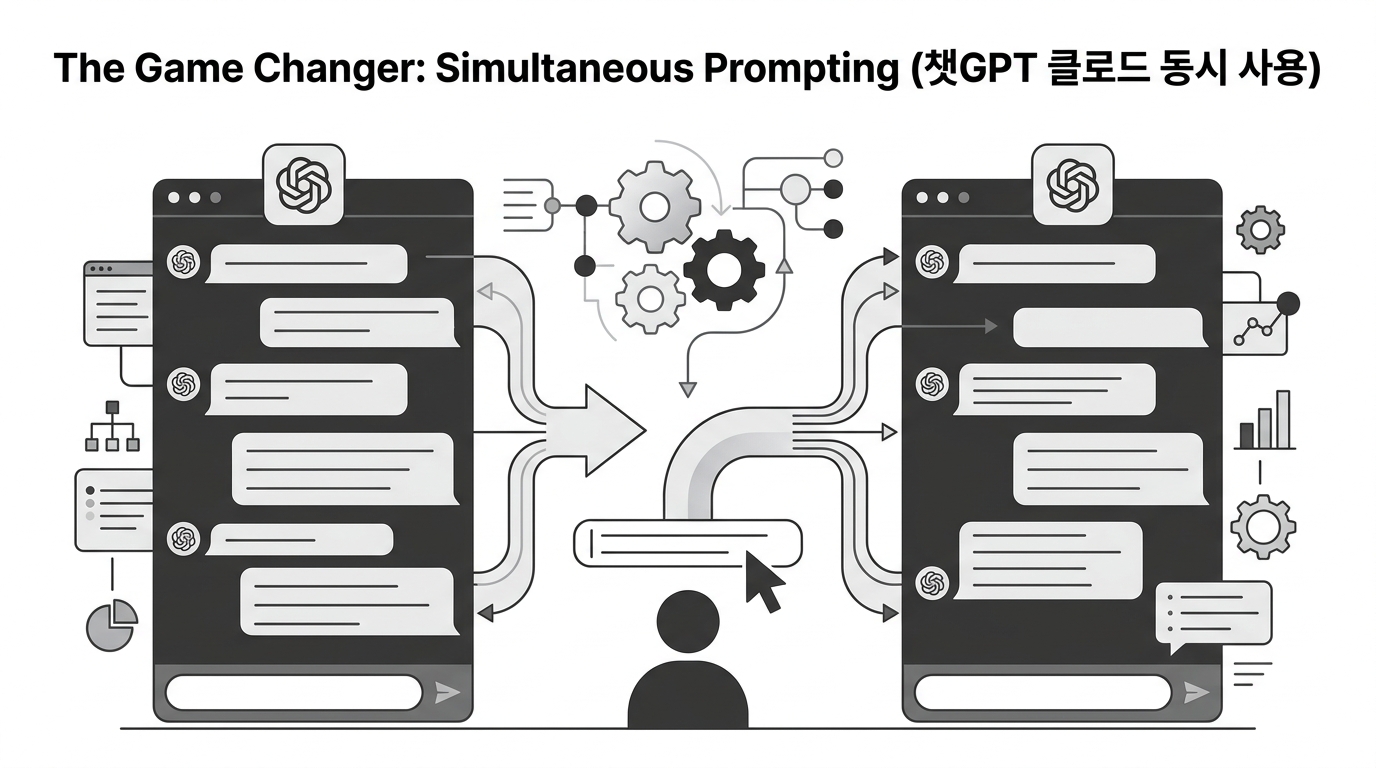
For my international and Korean peers, the concept of 챗GPT 클로드 동시 사용 (Using ChatGPT and Claude simultaneously) isn't just a neat trick—it's a mandatory workflow for high-level output.
Instead of sequential prompting (A -> B -> C), I now use parallel prompting. Here is exactly how I do it:
- I enter my master prompt into a single text box: "Analyze the attached 2026 Q1 tech trends report. Identify the top 3 contrarian insights, and draft a 5-minute YouTube script hook based on them."
- I hit "Send to All."
- On one screen, I watch ChatGPT outline the structure, Gemini pull cross-referenced search data to validate the trends, and Claude 3.5 Opus draft the actual script with its superior human-like tone.
Why You Need an AI Integration Platform (AI 통합 플랫폼)
You cannot achieve this workflow if you are logging into chatgpt.com, claude.ai, and gemini.google.com separately. The friction is too high.
You need an AI 통합 플랫폼 (AI integration platform). These are aggregators that plug into the APIs of OpenAI, Anthropic, Google, and others, giving you a single dashboard.
When I made this switch, I noticed three immediate benefits:
- Zero Context Loss: I upload my "Brand Voice PDF" once to the platform's global memory. Now, whether I trigger Claude or DeepSeek, they both read from the same foundational document.
- Cross-Model Chaining: I can highlight a paragraph generated by Gemini, right-click, and say, "Have Claude rewrite this specific paragraph to be funnier." It happens in the same window.
- Complete Audit Trail: I no longer lose brilliant prompts because I accidentally closed a tab. Everything is saved in one unified task history.
The Financial Reality Check (AI 구독료 절약)
Let's talk money, because this is where the math gets ridiculous. In Q1 2026, my monthly "AI Stack" looked like this:
- ChatGPT Plus: $20
- Claude Pro: $20
- Gemini Advanced: $20
- Various specialized image/video bots: $35
- Total: $95/month (Over $1,100 a year)
Here is the hard truth: I was only utilizing about 15% of the capacity of each of those subscriptions. I was paying for "all you can eat" buffets at four different restaurants, but I only have one stomach.
By moving to a unified platform that operates on a pay-as-you-go or credit system, my costs plummeted. This is the ultimate strategy for AI 구독료 절약 (AI subscription fee savings). Last month, I processed over 400,000 tokens of text, generated 50 images, and ran heavy data analysis. My total API/credit cost? $18.40.
My 2026 Tech Stack for Creators (크리에이터 AI 추천)
I get emails every week asking for my definitive 크리에이터 AI 추천 (AI recommendations for creators). If you are a solopreneur, freelancer, or content creator in 2026, here is the exact setup you need to adopt to stay competitive:
- The Core: A unified AI dashboard. Do not work outside of it.
- The Researcher: Gemini 1.5 Pro (via your dashboard) for pulling live web data and parsing massive PDFs.
- The Architect: ChatGPT (GPT-4o) for structuring your content, planning content calendars, and logical reasoning.
- The Writer: Claude 3.5 Opus. Never let ChatGPT write your final draft. Claude's phrasing, emotional intelligence, and lack of robotic clichés make it the only model I trust for final copy.
"The creators who win in 2026 aren't the ones with the best prompts. They are the ones with the most frictionless systems. Stop managing AI subscriptions and start managing AI workflows."
Discussion & FAQ
FAQ
Q: Doesn't a unified platform compromise the unique features of the standalone apps?
Actually, no. In 2026, the API endpoints for these models are often more powerful than their web interfaces. You lose the proprietary UI, but you gain system-level control over temperature (creativity) and system prompts, which the web apps often hide from you.
Q: Is simultaneous prompting confusing to look at?
It takes about two days to get used to. Once you train your eyes to scan three outputs side-by-side, going back to a single chat window feels like trying to work while looking through a keyhole.
Q: What about privacy?
API-based unified platforms generally have stricter privacy policies than consumer web apps. OpenAI and Anthropic do not use API data to train their models by default, whereas your standalone ChatGPT web conversations are used for training unless you opt out.
Over to You
I'm curious to hear from other practitioners. Are you still juggling 4-5 different AI tabs, or have you migrated to a unified workspace? What's the biggest "Context Collapse" disaster you've experienced this year? Drop your thoughts in the comments below—I read and reply to every single one.
Comments
Post a Comment