Table of Contents
- The April 2026 Dispute: When "Fast" Looked Like "Lazy"
- The "Invisible Work" Trap of Standalone AI Tabs
- Building the Proof-of-Work Pipeline
- A Real-World Claude vs Gemini Comparison (May 2026 Data)
- The Accidental Benefit: Extreme ChatGPT Subscription Savings
- Integrating Creator AI Tools into the Audit Trail
- Frequently Asked Questions
- Discussion: Are You Hiding Your AI Workflow?
The April 2026 Dispute: When "Fast" Looked Like "Lazy"
On April 14, 2026, a client refused to pay my $4,500 invoice. We had agreed on a scope for a comprehensive market analysis and brand messaging overhaul. I delivered the entire package in four days. The client's response? "There is no way a human did this in 96 hours. You just pushed a button on ChatGPT. I am not paying full price for an AI's work."
Two years ago, I would have panicked. I would have backpedaled, offered a discount, or tried to lie about my AI usage. But in 2026, the freelance game has completely changed. I didn't argue. Instead, I opened my AI aggregation platform, navigated to the Task History dashboard, and exported a raw, timestamped log of my workflow.
I sent them a 14-page PDF detailing exactly what happened during those four days. It showed 142 distinct prompts. It showed me feeding initial data into Gemini 1.5 Pro, extracting the anomalies, passing those into a custom Claude 3.5 Sonnet instance for tone-matching, and using a specialized empathy model to refine the copy. It showed the dead ends, the prompt refinements, and the complex multi-model AI usage that actually goes into "pushing a button."
The client paid the invoice in full the next morning. They also put me on a $2,000/month retainer.
This is the reality of modern freelancing. The value we provide is no longer in the raw typing speed; it is in the orchestration. But if you cannot prove that orchestration, you will be treated like a commodity.
The "Invisible Work" Trap of Standalone AI Tabs
Most freelancers are still stuck in the 2024 workflow. They have a tab open for ChatGPT Plus, another for Claude Pro, and maybe a window for Gemini Advanced. When a client project comes in, they bounce between these tabs, copy-pasting context, losing track of which model produced the best output, and ultimately delivering a final Google Doc.
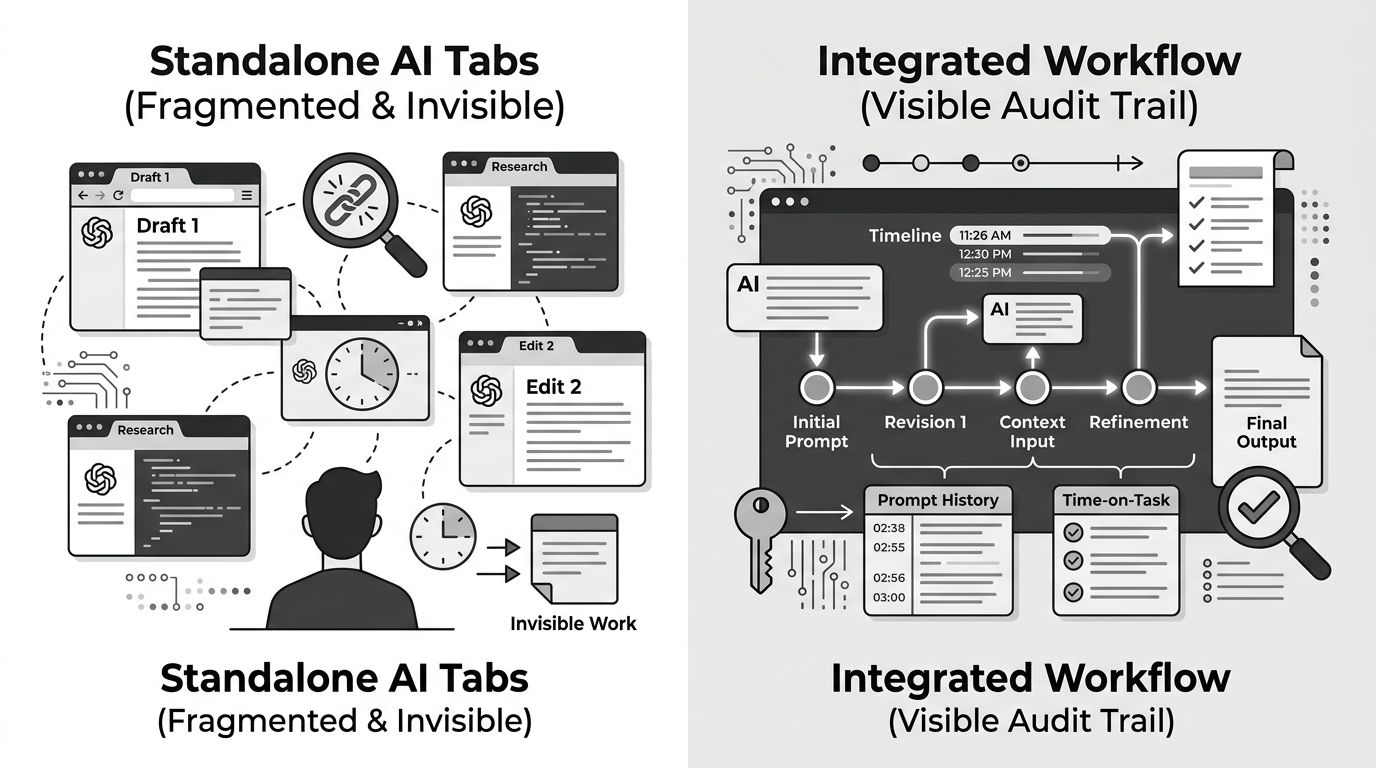
Here is the fatal flaw with that approach: Context Collapse and Zero Auditability.
When you use standalone models, your work history is fragmented across different ecosystems. If a client asks, "Why did we choose this specific brand voice?" you have to dig through three different chat histories to find the specific iteration that led to that decision. More importantly, you have no tangible proof of the intellectual labor required to get the AI to output high-quality work.
This is why transitioning to a unified dashboard was the single most profitable decision I made this year. By routing everything through a single interface that logs every interaction, I transformed invisible AI wrangling into highly visible, billable hours.
Building the Proof-of-Work Pipeline
To make this work, you need a system that inherently supports comprehensive logging. An AI aggregation platform isn't just a convenience tool; it is a system of record. Here is exactly how I structure my workflow to ensure maximum auditability.
First, I create a dedicated "Project Tag" in my dashboard before I type a single prompt. Every query, regardless of which underlying model I route it to, falls under this tag. I never use generic chat threads anymore. Every thread is highly specific: "ProjectX_CompetitorAnalysis_Gemini" or "ProjectX_ToneRefinement_Claude".
Second, I actively use the "Compare" feature during critical project junctures. If I am generating a high-stakes piece of copy, I will run the exact same prompt through three different models simultaneously. I leave the results in the Task History. Why? Because when the client inevitably asks, "Did we explore other angles?" I can literally screenshot the side-by-side output and say, "Yes, we tested the analytical approach (ChatGPT), the conversational approach (Claude), and the data-heavy approach (Gemini). We chose Claude because..."
A Real-World Claude vs Gemini Comparison (May 2026 Data)
To illustrate why logging this multi-model AI usage is so critical, let's look at a recent data extraction project I handled last week. I needed to parse 400 pages of messy, unstructured PDF transcripts and turn them into actionable marketing insights.

Many beginners would just throw this at the GPT-4o May update and pray. But my Task History tells a completely different, highly strategic story. Here is the actual data from my dashboard:
| Task Phase | Model Selected | Prompt Iterations | Why This Model? (The Billable Insight) |
|---|---|---|---|
| Raw Data Ingestion (400 pages) | Gemini 1.5 Pro | 3 | Massive 1M+ context window. It processed the entire PDF batch without losing the middle sections, which ChatGPT consistently hallucinated. |
| Data Structuring to JSON | DeepSeek V4 | 5 | Strict adherence to JSON schema. Gemini kept adding conversational filler at the end of the code blocks. |
| Insight Generation & Copywriting | Claude 3.5 Sonnet | 12 | Unmatched nuance in human tone. I fed it the DeepSeek JSON. Claude took the sterile data and wrote compelling, non-robotic narratives. |
| Final Polish & Formatting | ChatGPT (GPT-4o) | 2 | Best at following rigid markdown formatting rules for the final client deliverable. |
When you present a table like this to a client, the conversation shifts entirely. They are no longer thinking, "I could have done this myself." They are thinking, "I don't even know how to begin coordinating these different systems." You have elevated yourself from a typist to an AI Orchestrator.
The Accidental Benefit: Extreme ChatGPT Subscription Savings
There is a fascinating side effect to meticulously logging your multi-model AI usage: it radically reduces your overhead. For the first quarter of 2026, I was paying around $120 a month for various standalone premium subscriptions. It felt like a necessary business expense.
But once I shifted to an AI aggregation platform to maintain my Task History, I moved to a pay-per-credit (API-style) billing model. I assumed my costs would remain similar. I was wrong. My monthly AI expenditure plummeted to roughly $18.
How? Because Task History eliminates the "Prompt Memory Tax."
When you use standalone web interfaces, you lose your best prompts to the endless scroll of the sidebar. You end up re-typing, re-testing, and re-generating the same foundational instructions over and over again, burning expensive tokens every single time. By having a searchable, unified Task History, I simply pull up my perfectly refined prompt from last Tuesday, tweak the variables, and execute. I am no longer paying the AI to "figure out" what I want; I am only paying for the final execution.
This is the ultimate ChatGPT subscription savings hack. You don't save money by using inferior free models; you save money by never repeating your mistakes.
Integrating Creator AI Tools into the Audit Trail
This methodology isn't just for text-based freelancers. If you are a video editor or content creator, the audit trail is arguably even more important due to the ongoing copyright and originality debates.
I recently managed a project where we used specialized creator AI tools alongside our text models. We used Suno for background tracks and a diffusion model for B-roll generation. In the past, proving that these assets were uniquely prompted (and not just scraped or stolen) was a nightmare.
Now, my Task History includes the exact seed numbers, negative prompts, and iteration paths for every image and audio file. If a platform flags a video for synthetic content, or if a client needs assurance regarding commercial rights, I export the specific Task History block. It proves the asset was generated natively under my account, providing a clear chain of custody.
Frequently Asked Questions
Q: Won't clients steal my prompts if I show them my Task History?
A: This is a common fear, but it's unfounded. Knowing the prompt is only 10% of the battle. Knowing when to use which model, how to chain them together, and how to troubleshoot hallucinations is the real skill. Giving them the prompt is like giving someone a professional chef's recipe; they still won't cook it as well as the chef.
Q: Does keeping a detailed Task History slow down your workflow?
A: Initially, yes. It takes discipline to tag and organize your threads. But after two weeks, it speeds you up exponentially. You stop starting from scratch and start building a personal library of proven AI workflows.
Q: How far back should I keep my AI logs?
A: I retain my logs indefinitely. Storage for text-based Task History is virtually free. I routinely search my 2025 logs to resurrect workflows for new clients.
Discussion: Are You Hiding Your AI Workflow?
The freelance industry is splitting into two camps: those who try to pass off AI work as manual labor, and those who sell their ability to orchestrate AI better than anyone else. I firmly believe the latter group will command the highest rates by the end of 2026.
I'm curious about your experiences. Have you ever had a client push back on your rates because they suspected you used AI? Have you ever tried showing them your prompt iterations as proof of work? Drop your stories in the comments below—I read every single one.
🎬 Marketing Reel
Comments
Post a Comment